Stamp Credit Packs Explained: A More Flexible Way to Buy Credits and Downloads
Stamp Credit Packs Explained: A More Flexible Way to Buy Credits and Downloads
Stampdy has introduced one-time stamp credit packs. Each pack combines credits for generating AI stamp ideas with a set number of full-format downloads from the regular stamp editor. The aim is straightforward: people who make several stamps can buy a larger block once, receive better unit value than repeating small purchases, and use the included resources when their work actually comes up.
This is not a subscription. There is no monthly design quota to remember and no need to choose a recurring plan simply because one project contains several stamps. The pack is added to a signed-in account, where its AI credits and editor-download allowance can be used for their respective tasks.
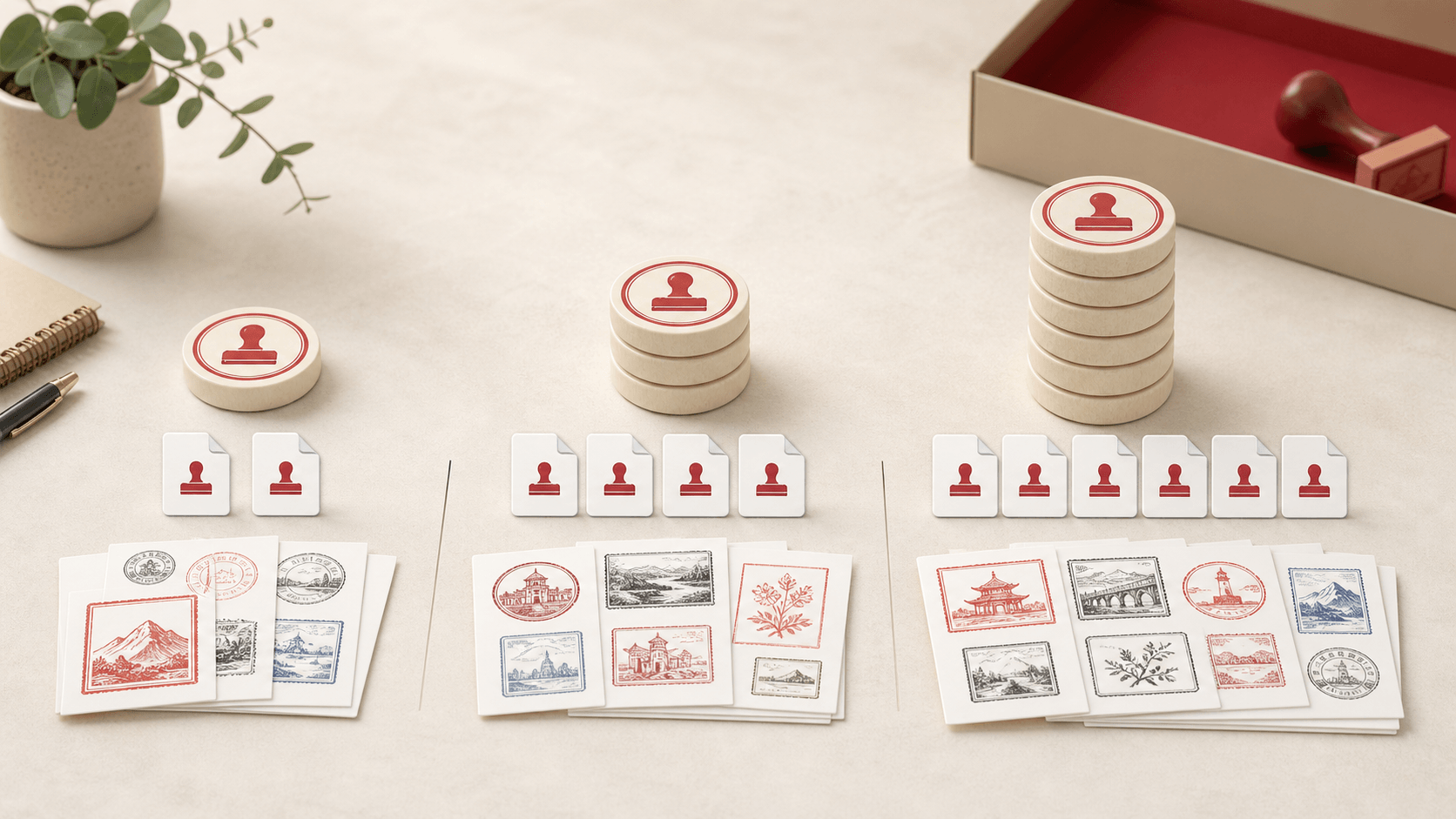
The current choices are deliberately easy to compare:
- $9.90 provides 180 AI credits and 5 full-format editor downloads;
- $19 provides 500 AI credits and 15 full-format editor downloads;
- $39 provides 1,500 AI credits and 30 full-format editor downloads.
One AI stamp generation uses 20 credits, so those credit amounts correspond to about 9, 25, and 75 generations. A generation is an opportunity to create an AI result, not a promise that every result will become a final business stamp. The included editor downloads are separate: each one can be used to export a completed editor design in the full set of PNG, JPG, SVG, EPS, PDF, and DOCX files.
Why put two kinds of value in one pack
Stamp work often has two distinct stages. At the beginning, someone may want to explore visual directions quickly. They try different wording, emblems, shapes, or styles and narrow the results down to one or two useful ideas. That is where AI generation credits are useful.
Later, the work becomes precise. The approved name must be spelled correctly, registration text needs to fit, a border may need adjustment, and the files have to work in documents or production systems. That is where the regular stamp maker editor and its multi-format export are useful.
A pack connects those stages without pretending they are the same activity. Credits are spent on AI generations. Editor downloads are spent on full export packages. Buying a pack does not turn every AI image into an editor file automatically, and downloading an editor design does not consume the AI balance. The two allowances sit together because many real projects use both.
What “more economical” means here
The larger packs lower the effective cost of the resources compared with repeatedly buying the smallest options. That advantage matters when you already expect multiple projects, branches, clients, or rounds of exploration. It matters less when you need one simple stamp and do not expect to return.
It is useful to look past the headline price and calculate what your own work needs. The $9.90 pack is roughly enough for nine AI generations plus five full editor exports. The $19 pack provides around twenty-five generations and fifteen exports. The $39 pack provides around seventy-five generations and thirty exports. The middle and larger tiers give notably more capacity for each dollar, but they are only better value if that capacity will be used.
This is a practical discount structure, not a reason to buy the biggest option by default. A small office preparing two marks may be better served by the starter pack. An agency handling recurring client requests may find the larger pack easier to budget and administer.
The three packs in everyday terms
The 180-credit pack suits a contained project. Imagine a new business exploring several AI concepts, choosing one direction, and then building a few related editor versions for a letterhead, an invoice, and a departmental mark. Nine approximate generations leave room to compare ideas without opening a very large balance. Five editor downloads cover a handful of finalized designs or later revisions.
The 500-credit pack suits a team with a queue rather than a single task. Twenty-five approximate generations allow more deliberate exploration across several stamps. Fifteen editor downloads can support different offices, languages, approval states, or client deliverables. This tier is likely to feel natural for a small agency, operations team, or business rolling out a consistent family of marks.
The 1,500-credit pack is intended for repeated work. Around seventy-five generations give a studio or multi-branch organization room to explore many directions over time, while thirty editor downloads support a meaningful set of finished outputs. It has the strongest scale advantage, but it also asks the buyer to be realistic about future demand.
A closer look at AI credits
AI generation is useful when the blank page is the main obstacle. A written prompt can establish a rough visual direction faster than manually assembling every early idea. You might compare a traditional circular seal with a restrained modern mark, test different center emblems, or explore how a business category could be represented visually.
Each generation costs 20 credits. That fixed unit makes the balance understandable: divide the displayed credit total by 20 to estimate how many generation attempts remain. The result is an estimate of creative attempts, not finished deliverables. Some results may be kept, some may inspire an editor design, and some will simply show what not to pursue.
Good prompting helps the credits go further. Describe the stamp type, shape, wording, visual tone, and important constraints before generating. “Circular accounting stamp, restrained red ink, clear center initials, no decorative crown” gives the system more useful direction than “make a nice stamp.” A focused prompt cannot guarantee a perfect result, but it reduces random exploration.
The AI stamp tool is best treated as a concept and creation tool. Check every generated word, symbol, and detail before using a result in business work. AI images can misunderstand text or introduce decorative elements that were not requested. Human review remains part of the process.
A closer look at editor downloads
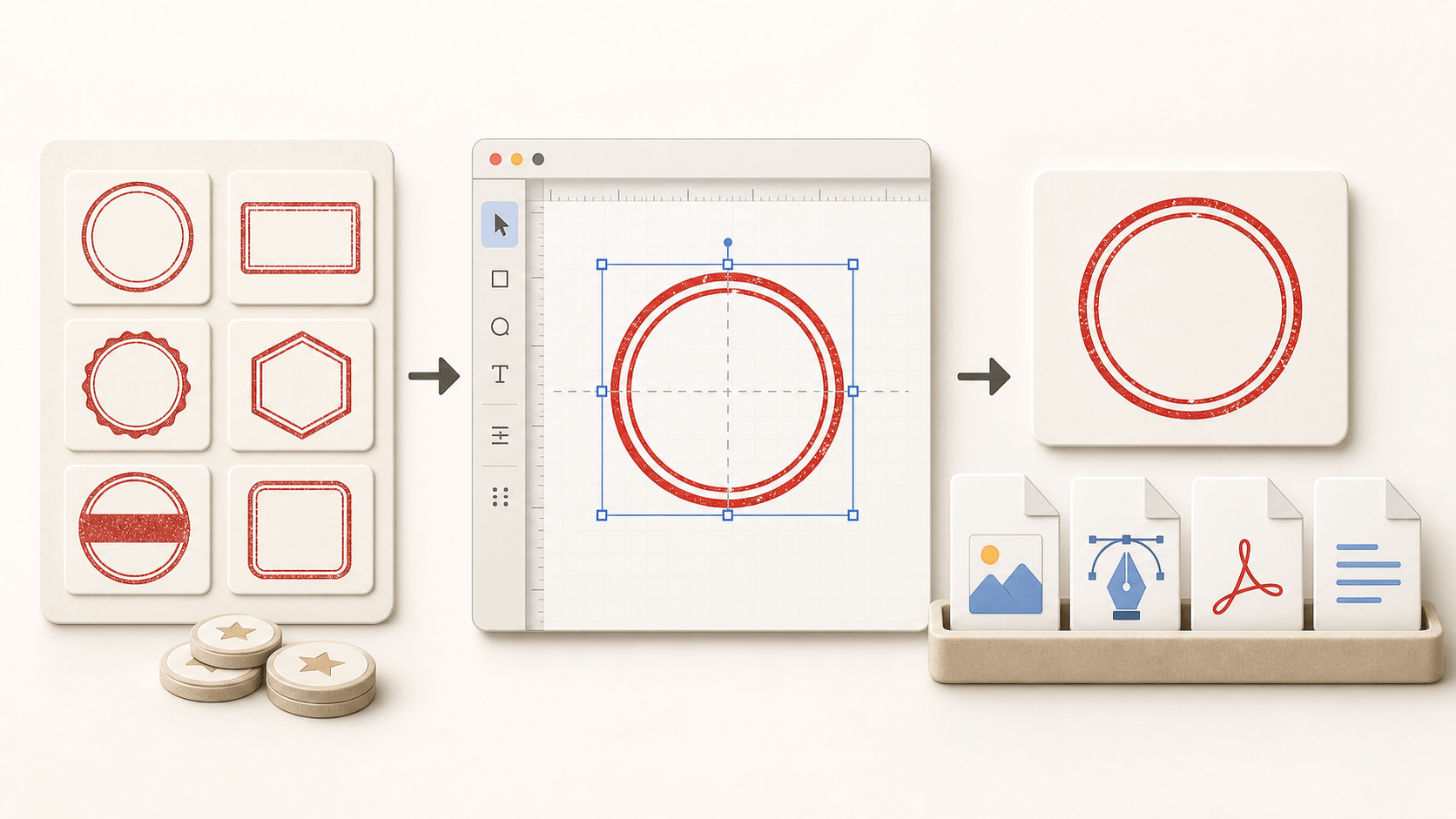
The regular editor is where layout becomes controlled. You can work with text, shapes, uploaded graphics, borders, spacing, and effects while seeing the design directly. When it is ready, one included full-format download produces the practical set of files used across office, web, and production workflows.
That set includes transparent PNG, white-background JPG, scalable SVG, EPS for common production handoffs, PDF, and DOCX. A single completed design can therefore move into several destinations without manual conversion. The JPG can be shared as an easy preview, the PNG can sit over a colored document, and SVG or EPS can go to a supplier that requests vectors.
An editor download is consumed when a full-format export is used through the pack allowance. It is sensible to review spelling, alignment, dimensions, and visual balance before downloading. If the design is still exploratory, keep editing rather than treating an export as a casual preview.
Who benefits most from a pack
Small agencies are an obvious example. A designer may receive several modest stamp requests each month, none large enough to justify a complicated procurement process. A one-time pack creates a shared pool of practical capacity without adding another recurring subscription to track.
Multi-branch businesses may also find packs useful. Head office can establish a common visual structure, while each branch needs its own name, location, or department line. The AI balance can help explore a family style, and the editor allowance can cover approved branch variations.
Operations, HR, legal-support, and finance teams sometimes need stamps in bursts. A policy change, office move, new entity, seasonal intake period, or document migration can create several related requests at once. Buying capacity for the project may be easier to explain internally than signing up for a monthly plan that outlives it.
Independent professionals can benefit when they serve multiple clients. The key is to keep client designs and approvals organized. A shared credit balance is convenient, but each final stamp still needs its own brief, review, filename, and delivery record.
Who may not need one
A person creating one straightforward editor stamp may not need a pack. If there is no interest in AI exploration and no likely second or third export, a larger combined allowance could remain unused. Better unit pricing does not help when most units are unnecessary.
A subscription may suit a team with continuous, predictable usage and different plan benefits. The pack is specifically useful for people who prefer a one-time purchase or whose workload arrives in projects and bursts. Compare the actual task pattern rather than assuming one payment model is always cheaper.
Highly specialized production teams may work mainly in vector software and need only an occasional Stampdy reference. Their decision should be based on the tools already in the workflow. A credit pack is useful when both creation and editor export solve real steps, not simply because the bundle is available.
How to choose without overbuying
Start with the next three to six months of known work. Count the stamps that are genuinely requested, then add a modest allowance for revisions or new branches. Do not turn a vague possibility into dozens of assumed projects just to justify a bigger tier.
Next, separate exploration from final output. How many different concepts will the team reasonably compare? How many finished editor designs are likely to require full-format files? These numbers will rarely match. One stamp might take four AI generations and one editor download; another may be built directly in the editor with no AI use at all.
Finally, consider who controls the account. Packs require sign-in so balances and downloads can be associated with the user. A company should buy through an account that will remain accessible to the responsible team rather than an employee’s temporary or personal address.
A simple estimate can look like this:
- List the expected stamp projects.
- Estimate two to five AI attempts for projects that need visual exploration.
- Count one editor download for each finalized design that needs the full file set.
- Add only the revisions you have a concrete reason to expect.
- Choose the smallest pack that comfortably covers the total.
This method is less exciting than chasing the largest discount, but it usually produces the better purchasing decision.
Example: a five-branch office update
Suppose a business has moved its head office and also wants to standardize stamps for five branches. The core visual style is already known, so the team expects limited AI exploration: perhaps ten to fifteen generations to compare center emblems and border treatments. It then needs six final editor designs, one for head office and one for each branch.
The smallest pack includes only five editor downloads, so it falls just short even though its AI balance might be enough. The middle pack includes fifteen downloads and about twenty-five AI generations. It leaves reasonable space for one or two revised branch files without forcing the team into the largest tier.
This example shows why both columns matter. Choosing only by credit count would miss the editor-download requirement. Choosing only by price would miss the amount of actual work.
Example: a freelance designer with uneven demand
A freelance designer may handle no stamp work for several weeks and then receive three requests together. A recurring plan can feel awkward when demand is uneven. A pack allows the designer to purchase capacity at the start of a real project and use the remainder on later client work.
The designer should still price services based on time, review, and responsibility rather than dividing the pack price by the number of files. Credits and exports are tool inputs. Client communication, text checking, revision management, licensing checks for uploaded graphics, and production coordination remain professional work.
The middle tier may be a sensible starting point when several projects are confirmed. The largest tier makes more sense after the designer has enough history to know that dozens of generations and exports will be used.
Example: one stamp for a new business
A new sole trader may want a single address stamp and a few visual ideas. The starter pack already provides more than one final export and enough AI attempts to compare several approaches. Even then, the person should ask whether AI is necessary. If the desired layout is a standard circle with known text, building it directly in the editor may be quicker.
The remaining downloads can be useful for a later address change or an alternate design, but they should not be treated as an obligation to create more stamps. The smallest appropriate purchase is often the most economical choice for an individual project.
Getting more useful results from each generation
Write the factual content before writing the style request. Confirm the organization name, abbreviation, location, year, and any required wording. Decide which text belongs on the outer ring and which belongs in the center. If an emblem is needed, describe it in plain terms.
Then specify visual constraints. State the shape, main color, level of detail, and whether the result should feel traditional, administrative, industrial, friendly, or formal. Mention elements to avoid. A short, concrete brief makes comparison easier because each result is responding to the same need.
Do not ask the AI image to settle legal or compliance questions. Whether a particular seal is authorized, required, or acceptable depends on the organization and jurisdiction. Use generation to explore appearance, then have the appropriate person approve wording and usage.
Preparing an editor design before download
Treat the editor file as the source of truth for precise content. Read every line at normal size and zoomed in. Check that circular text begins and ends where expected, spacing is even, and uploaded logos have enough contrast. If an aged effect is used, make sure it does not remove important letters.
Test the design at its intended physical or document size. A border that looks balanced on a large screen can become heavy when reduced. Fine details may disappear on an office printer or physical stamp. Print a draft when the output will eventually be manufactured.
Only then use the full-format download. Keep the ZIP files together or extract them into a clearly named project folder. The stamp export guide explains the roles of common formats if a recipient is unsure which file to use.
Keeping the account and balances organized
Because pack resources belong to an account, use a sign-in that makes sense for the work. A shared role address controlled by the business may be more durable than an account tied to a short-term contractor. Follow the organization’s normal password and access policies rather than casually sharing credentials.
Keep a lightweight record of important exports. It can be as simple as project name, approved version, download date, and responsible reviewer. The account balance tells you how much capacity remains, but it does not explain why a particular stamp was approved.
If several people request work, appoint one person to perform final downloads. This reduces duplicated exports and helps ensure the correct version receives the full file package.
Why one-time packs fit project work
Subscriptions are useful when work is continuous. Project work is different. A company launch, branch rollout, rebrand, address change, or document-system cleanup creates a temporary cluster of tasks. After the project, activity may fall to almost zero.
A one-time pack maps neatly to that pattern. The buyer can approve a known cost for a defined body of work without creating a recurring line item. The larger tiers reward people who can genuinely use more capacity while leaving a smaller entry point for limited projects.
The combined structure also reflects how stamp projects move. Early exploration consumes attempts; finalization consumes exports. Keeping both in one purchase is easier than stopping midway to arrange a second kind of access.
Review the remaining balance at natural project milestones rather than after every small action. A quick check after concept approval and again after final delivery is usually enough to spot whether the original estimate was realistic. That record can make the next pack choice smaller and more accurate.
The limits of a discount
Lower unit cost should not replace judgment. A pack cannot make an inaccurate stamp useful, recover time lost to an unclear brief, or decide who has authority to approve a seal. Those are process questions.
Nor does a large credit balance guarantee better creative results. Ten focused generations based on a good brief can be more useful than fifty loosely directed attempts. The economical habit is not merely buying credits at a lower rate; it is using fewer attempts to reach a sound decision.
The same principle applies to downloads. Review first, export second. Keep versions organized. Send the correct format to the correct recipient. Avoid using a full export simply to check whether a typo exists.
A practical way to think about the new option
Stamp credit packs are best understood as project capacity. The starter tier covers a small batch, the middle tier supports several active designs, and the largest tier is built for repeated work. Each tier includes both AI exploration and controlled editor output because many users move between those two modes.
The value is real when the work is real. If you already know that several stamps, branches, or clients are coming, a pack can reduce repeated purchases and lower the effective cost of each unit. If you need only one uncomplicated file, choose a smaller route and keep the process simple.
Before buying, count likely generations and final exports separately. Choose the smallest tier that covers both with sensible breathing room. Then use the AI balance for exploration, the editor for accurate construction, and the download allowance only after review. That approach captures the discount without turning the bundle into an excuse to overbuy.
The new packs are available through Stampdy’s stamp workflow for signed-in users. They offer a clearer middle ground between a single task and an ongoing subscription: pay once, keep the resources attached to the account, and use them as actual stamp work arrives.