Clean Uploaded Stamp Images With an Online Maker
Uploaded stamp images are usually imperfect. They come from a phone camera, a scan, a PDF screenshot, or a photo of an old rubber stamp impression. The mark may be useful, but the background is not: paper grain, shadows, tilt, uneven ink, and a white rectangle that covers the document underneath. To clean uploaded stamp image online, treat the work like restoration, not redesign. The point is to keep the identity of the mark while removing the noise that makes it hard to place on modern documents. The Stampdy Upload Stamp Maker Online is built for that narrow job.
Start with the least-bad source
A cleanup tool can do a lot, but it cannot fully fix a bad source. Use the highest-resolution file you can get. If you have a choice, scan the stamp flat instead of photographing it at an angle. Avoid shadows across the mark, glossy paper, and images where the stamp touches other handwriting.
A practical upload stamp maker online workflow begins with a quick source check: Is the whole mark visible? Are the letters readable? Is the border complete enough to preserve? Is the paper texture lighter than the ink? If the answer is no, capture the image again before you spend time cleaning it.
For teams that need a new design rather than cleanup, the Stampdy stamp maker may be a better starting point. Do not force restoration when the source is clearly weaker than a fresh build.
Use cleanup strength slowly
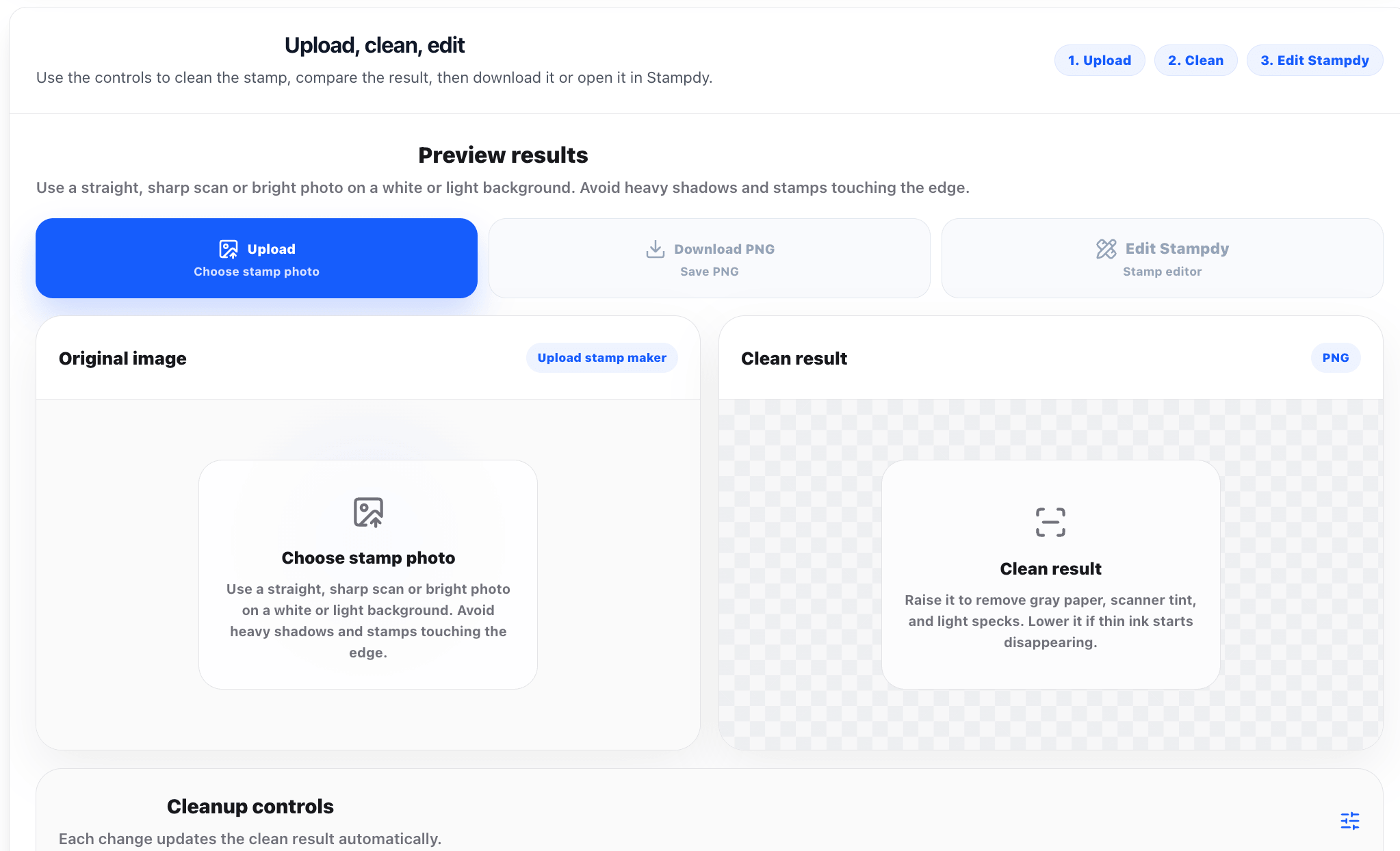
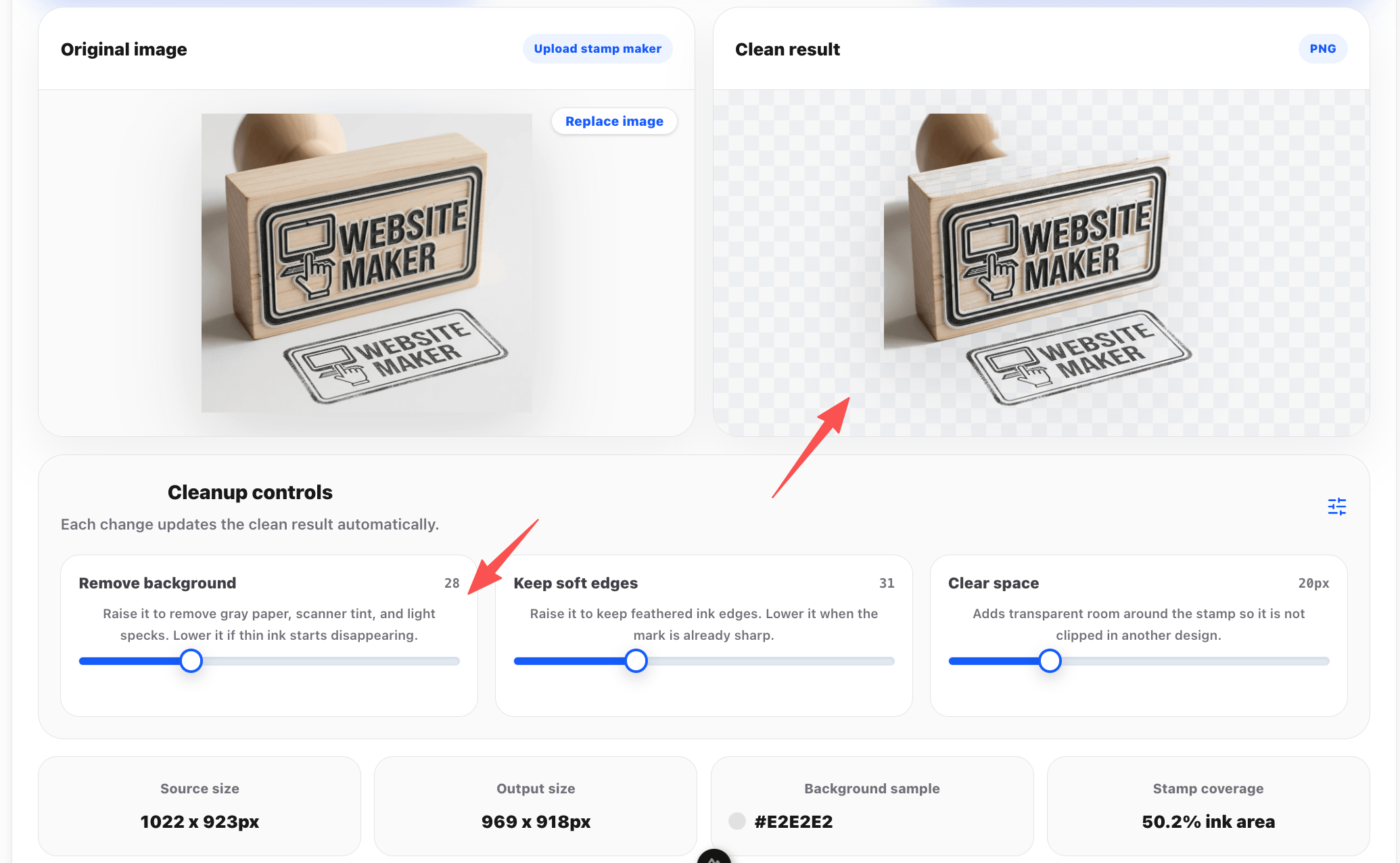
Background removal should feel like a dial, not a switch. Push it too far and thin letters disappear. Keep it too low and the cleaned PNG carries gray paper shadows. Adjust, preview, and compare. The best result often preserves a little natural edge while removing the background that would block a document line.
When you remove background from stamp image files, look closely at counters inside letters, the inner ring, and any small center text. These areas fail first. If the stamp says RECEIVED, APPROVED, or PAID, the operational word matters more than the rough ink texture.
After cleanup, a separate layout pass is useful if the mark needs a border adjustment or a better placement frame. Cleanup removes noise; layout review solves design problems.
Add breathing room around the mark
Transparent padding is easy to overlook. A tightly cropped stamp may look efficient, but it becomes annoying when placed near text. Give the mark enough transparent space so it can sit beside a signature block, table, or form field without touching nearby content.
This is where a transparent stamp PNG maker earns its keep. The output should not just be transparent; it should be comfortable to place. Test it in the actual document area, not only on a blank white canvas. A stamp that works on white may still collide with table rules or pale form backgrounds.
For a broader free-tool context, the free rubber stamp creator guide is useful when a cleanup job turns into a rebuild job.
Compare source and cleaned export
Keep the original file beside the cleaned export. The source proves what you started from, and it helps reviewers decide whether the cleaned version still represents the same mark. This matters when the stamp belongs to a department, branch, or recurring approval process.
A good review is simple: source on the left, cleaned PNG on the right, sample document below. If the cleaned version has lost important letters, border detail, or department wording, adjust again. If it looks cleaner without changing meaning, it is ready for placement.
The article on how to create a stamp online can help when the old mark is too damaged and the team decides to build a cleaner replacement instead.
Name the cleaned file like an asset
Do not leave the final export as download.png. Use names that identify the mark: warehouse-received-red-clean.png, clinic-reviewed-blue-current.png, or branch-a-approved-transparent.png. A clean file with a vague name will become clutter as soon as another version appears.
If the workflow is a free stamp cleanup tool process, the review record matters even more. Free and fast tools are valuable, but they can produce a pile of near-identical images. A clear name, source copy, and approved folder prevent the wrong version from reaching documents.
For rubber stamp-specific layouts, rubber stamp templates can help the team decide whether cleanup or redesign is the better long-term option.
Know when cleanup is not enough
Some marks should be rebuilt. If the source image is missing a section, the text is outdated, or the border is too damaged to recognize, cleanup will only make a flawed asset neater. At that point, rebuild the stamp with current wording and use the old image only as a reference.
A cleaned stamp should make document work easier. If people still have to explain what it says, where it came from, or whether it is current, the cleanup did not solve the real problem. Use the online tool to save time, but let the document owner decide whether the mark is trustworthy.
A cleanup session that does not over-polish
Imagine a warehouse supervisor and an admin clerk working through a return authorization form. The starting point is a scan of a red RECEIVED stamp on yellowing paper, not a polished brand system. That is why the first few minutes matter. The team should name the job, decide who can approve the mark, and create one draft file with a clear temporary name such as warehouse-received-cleanup-draft.png. That sounds mundane, but mundane is good here. Stamp work goes wrong when people treat every file as temporary and then reuse the temporary file for months.
The practical question is where the mark will appear. In this case, it belongs above the intake notes field. That placement tells you how large the text can be, whether the border can be heavy, and how much transparent space should surround the asset. It also keeps clean uploaded stamp image online connected to a document, not just to a preview screen.
After the first export, the team should save one approved file named warehouse-received-transparent-current.png. The source, draft, and final file should not sit in the same folder without labels. A person who was not part of the original conversation should be able to open the folder and know which file belongs in the next document.
What to preserve from the uploaded image
A useful brief is short, but it should not be vague. It should say what the stamp means, which text is fixed, which source file was used, and what output is expected. If the owner is Warehouse Operations, put that in the note. If the stamp is only for PDF placement, say that too. Teams get into trouble when a file made for one narrow use quietly becomes the default for every use.
For upload stamp maker online, I would rather see a plain note than a polished paragraph. Example: "Use this mark for a return authorization form. Keep current wording. Export transparent PNG. Owner: Warehouse Operations. Do not use for external legal seals." That kind of note has no marketing shine, but it prevents the exact questions that slow people down later.
The brief should also say what is out of scope. If the stamp should not include a date, a fake registration number, a decorative icon, or a simulated signature, write that down. Negative instructions are not fussy. They are a way to keep office marks from collecting details that nobody approved.
How to tell whether the cleanup went too far
The obvious failure to watch for is this: paper shadow remains inside the transparent PNG and covers form lines. A quick preview may not catch it. Place the stamp into a return authorization form and read the page the way a recipient would read it. If the mark makes a table, date, signature, or status line less clear, the design is not finished.
A good review uses three views. First, inspect the stamp close up for text and edge problems. Second, look at it at normal document size. Third, print or export a single sample page if the workflow is repeated. This is where remove background from stamp image becomes more than a keyword; it becomes a practical check on whether the file can survive daily handling.
Do not ask reviewers whether they like the stamp. Ask better questions: Is the wording current? Is the owner clear? Does the mark sit in the right place? Does the file name identify the approved version? Would a new teammate choose the right file without asking? Those questions produce actionable feedback.
Decide what the cleanup may change
Before touching sliders, decide what the cleanup is allowed to change. It may remove the paper background. It may soften scanner noise. It may straighten a slightly tilted mark. It may add transparent padding. It should not rewrite the stamp text, invent missing letters, change the owner, or make an old department name look current when it is not.
That boundary matters because restoration can quietly become redesign. A warehouse team may only need a cleaner RECEIVED mark for return forms. If the tool turns the old impression into a new brand seal, the file may look better while becoming less honest. A free stamp cleanup tool is most useful when the operator knows which defects are visual noise and which details are part of the original mark.
For practical work, write the boundary in one line before cleaning: "Keep original wording and red impression, remove paper background, export transparent PNG for return authorization forms." That note gives the reviewer something concrete to check. It also keeps the cleanup from becoming a taste contest.
Use a source-quality score
Not every uploaded image deserves the same amount of time. Give the source a quick score before you start. Text readability, border completeness, background contrast, and perspective can each be scored as good, acceptable, or poor. If two of those are poor, recapture the image if possible. If all four are acceptable, the cleanup is likely worth doing.
This score is not formal. It is a way to avoid wasting half an hour on a source that should have been rescanned. For example, a phone photo with a complete border but a shadow across the center text may be fixable. A screenshot where half the ring is cropped is not a cleanup problem; it is a missing-information problem.
The phrase clean uploaded stamp image online sounds like one action, but the real workflow starts earlier. The operator is deciding whether the source has enough information to preserve. If the uploaded file cannot answer that question, the maker cannot solve it by guessing.
Shadows, fibers, and broken ink
Old stamp impressions carry three kinds of roughness. Shadows are usually bad because they sit behind the mark and block documents. Paper fibers are usually bad when they survive into the transparent export. Broken ink is more complicated. A little broken ink can make the mark feel natural; too much broken ink can make the text hard to read.
When you remove background from stamp image files, separate those problems instead of treating them as one blob of noise. Push the cleanup enough to remove the paper rectangle. Then stop and look at the letters. If thin strokes are disappearing, back off. If paper grain remains between letters, increase cleanup slightly or crop around the problem area.
Do not judge the file only on a checkerboard preview. Place it on the form background where it will live. A faint gray stain that looks harmless in the maker can become obvious when it covers a pale table row. A tiny ink break that looks rough at 300 percent may be invisible at normal placement size. The document view decides.
Compare three versions, not two
Most teams compare the source and final export. A better review uses three versions: original upload, first clean export, and approved export. The first clean export shows what the tool did automatically. The approved export shows the human decision after adjustment. Keeping all three prevents the team from forgetting why a setting changed.
This is especially useful when the first pass looks too perfect. A heavily cleaned stamp may lose small center text, ring texture, or the natural edge of the impression. The approved file should be cleaner than the source, but it should still be recognizable as the same operational mark. If the approved export looks unrelated to the source, the team may need a rebuild instead of cleanup.
A transparent stamp PNG maker should produce a file that is easy to place, not just a file with the background removed. Check the transparent margin, the visual weight, and the way the mark sits above form fields. If the file feels cramped, add padding. If it floats too far from the form text, crop a little tighter.
Folder rules for restored stamps
Restored stamps need stricter names than freshly designed stamps because the source can be misleading. Keep the original upload in a source folder. Keep test exports in a draft folder. Keep only the approved transparent PNG in the shared placement folder. If every file sits together, someone will eventually use the wrong version because it looks close enough.
Use names that say what the file is: warehouse-received-source-scan.jpg, warehouse-received-cleanup-draft.png, warehouse-received-transparent-current.png. Those names are longer than download.png, but they are easier to trust. They also make it obvious which file should be attached to a return authorization form.
If the mark changes later, do not overwrite the current file silently. Move the old export into an archive and add the review date to the replacement. Many document teams deal with old PDFs months later. They need to understand why a stamp in an older record looks different from the one used today.
When cleanup should become a rebuild
Cleanup has a limit. Rebuild the stamp when the source text is outdated, when missing letters have to be invented, when the border is too damaged to identify, or when the mark needs a new layout for a new process. A cleaned image should preserve a usable mark. It should not pretend that a broken source is authoritative.
This decision is easier when the owner is named. Warehouse Operations can approve whether a RECEIVED stamp is still current. A designer can advise on appearance, but the process owner decides meaning. If nobody can approve the old wording, the team should stop cleaning and build a new asset with current text.
The upload tool still helps in that situation. The old scan can become a reference for size, color, or style. The final mark may be rebuilt elsewhere, but the cleanup review helped reveal that the original file was not reliable enough for daily use.
Close the job with one sample page
The last step is not another export. It is one sample page. Place warehouse-received-transparent-current.png on a return authorization form at the intended size. Export the page to PDF. Open it again and read it as if you were not part of the cleanup. If the mark is clear, the background is gone, and the file does not cover form content, the job is finished.
Send the sample page with the approved PNG when the file is handed to another person. That tiny habit saves long explanations. The next teammate can see the intended placement, size, and document context immediately.
The practical value of upload stamp maker online is speed, but speed only helps when the output is controlled. A restored stamp should have a source, an approved transparent export, a named owner, and one real document check. Without those pieces, the team has a cleaner image but not a dependable office asset.
A delivery note that prevents repeat cleanup
The cleaned file should travel with a short delivery note. It can be three sentences: the source used, the cleanup decision, and the approved use. For example: "Source was warehouse-received-source-scan.jpg, scanned from the current red RECEIVED stamp. Background and paper shadow were removed; original wording and rough ink edge were kept. Use warehouse-received-transparent-current.png only on return authorization forms."
That note prevents repeat work because the next person can see what was already decided. Without it, another teammate may upload the same source again, choose a stronger cleanup setting, and produce a second file that competes with the first. The problem is not the tool. The problem is a missing record of the decision.
It also keeps the transparent stamp PNG maker workflow honest. A transparent file can look finished even when nobody has approved the meaning. The note ties the export back to a real source, a real owner, and a real document.
Judgment calls during cleanup
Some cleanup choices do not have one perfect answer. A broken outer ring may be acceptable if it matches the original rubber impression. A missing letter is not acceptable if it changes the word. A little ink texture may help the mark feel like the real stamp. A gray paper box behind that texture is just residue. The operator needs to make those calls deliberately.
When in doubt, protect readability first. If keeping texture makes RECEIVED hard to read, reduce the texture. If removing every rough edge makes the mark feel suspiciously rebuilt, keep a small amount of natural ink variation. The cleaned stamp should look like a well-prepared version of the source, not like a different asset pretending to be old.
These decisions are why a side-by-side view matters. Look at the source, the cleaned export, and the document placement together. Each view answers a different question: where did the mark come from, what changed, and does it work in the file?
What the final folder should contain
A finished cleanup folder does not need many files. Keep the source image, the approved transparent PNG, one sample PDF page, and the delivery note. Move failed exports and unused drafts out of the shared placement folder. They can stay in an archive if the team wants a history, but they should not sit beside the file people use every week.
This is a small habit, but it changes how the stamp is reused. A new admin clerk can open the folder, see warehouse-received-transparent-current.png, view the sample page, and understand the intended placement without asking the warehouse supervisor to explain the project again.
That is the difference between a cleaned image and a working office asset. The upload tool handles the visual repair. The folder, note, and sample page make the repaired mark dependable.
Keep the next cleanup easier
The best cleanup process leaves clues for the next cleanup. If the team later uploads a new impression of the same stamp, they should know which source worked, which setting was too strong, and where the final file was tested. A one-line note such as "medium cleanup kept RECEIVED readable; strong cleanup damaged the inner letters" saves time because it records judgment, not just the final result.
This matters when the same department has several physical stamps. A warehouse may have RECEIVED, CHECKED, RETURNED, and VOID marks that all come from similar scans. Once the team has a working cleanup pattern, reuse the method, not the exact file. Each mark still needs its own source check, transparent export, and document sample.
That is how clean uploaded stamp image online becomes a repeatable office routine instead of a one-off rescue job.