Electronic Signature Audit Trail: A Practical Guide for Small Teams
An electronic signature audit trail should make a signing request understandable after the people involved have moved on to other work. A reviewer should be able to identify the document, see who was asked to sign, follow the request status, locate the completed PDF, and understand what the team did next. That does not require a complicated records program, but it does require more than saving an image of a signature.
For a small team, the most useful approach is to connect the signing record with ordinary document control. Decide which file was approved for sending, keep the request history, store the returned document in a predictable place, and record the business action that follows. The result is a trail that supports operational review without pretending that one screen or certificate answers every legal, identity, or compliance question.
What an Electronic Signature Audit Trail Should Explain
An audit trail is a sequence of records, not a decorative label. In a signing workflow, it should answer four practical questions:
- What document entered the signing process?
- Who was expected to act, and where?
- What events occurred while the request was open?
- Which completed files and follow-up records were retained?
The exact evidence needed depends on the document and the organization. A routine internal acknowledgment may need less review than a customer contract, employment document, regulated form, or high-value purchase. Requirements can also vary by jurisdiction and transaction type. Treat the trail as operational evidence that helps a reviewer reconstruct the process, not as an automatic guarantee of legal enforceability.
A visible signature on the final page is only one part of that sequence. It shows what appears on the document, but it does not by itself explain how the file was selected, how the signer received access, whether the request was replaced, or where the completed record was stored. Those surrounding decisions are where small teams often lose context.
Define the Record Before Sending the Request
The cleanest audit trail starts with a controlled input. Before creating an electronic signature request, give the PDF a stable title and filename. Remove drafts that could be mistaken for the final version, then confirm that names, dates, totals, attachments, and signature locations are correct.
Record the owner of the request. This is the person responsible for preparing the PDF, confirming recipients, monitoring progress, and closing the workflow. Ownership matters because a request can reach “signed” status while a downstream task remains unfinished. Someone still needs to download or store the result, update the relevant business system, and tell the next person that the document is ready.
The request owner should also know why each recipient is included. Avoid adding people “just in case.” Distinguish signers from reviewers, approvers, and people who only need a copy. If the organizational authority of a signer matters, verify it before sending rather than treating a completed field as proof that the person had authority.
Stampdy's electronic signature workspace supports a PDF workflow in which the sender can prepare a document, assign signing locations, and create a request. Use those controls as part of a defined process: correct file, correct recipients, correct fields, and a named owner.
Capture Recipient, Field, and Timing Decisions
Recipient setup is part of the record because it explains who the sender intended to sign. Use recognizable names and working email addresses. When several people are involved, review the list against the document rather than relying on memory.
Place each signature field where the signer can understand its purpose from the page context. A field that floats between two clauses or sits beside the wrong name creates ambiguity. Check the page number, width, height, and placement for every recipient. If the sender also needs to sign, include that role deliberately rather than adding it at the end without another preview.
Expiration and reminder settings should match the business deadline. A short routine approval may need a simple reminder, while a negotiation still in progress may be better left unsent. Document replacement also needs a rule: when terms change, cancel or close the obsolete request and create a new one from the approved revision. Do not leave two active versions competing for signatures.
The optional message should identify the document and expected action in plain language. Avoid placing sensitive contract details in the message when the document itself already contains the necessary context. The objective is recognition: the signer should know why the invitation arrived and what to do next.
Use Status and Event History as Working Evidence
After sending, monitor the request from the Stampdy signature requests page. The current interface distinguishes states such as pending, viewed, partially signed, completed, expired, and cancelled. Those states help the owner decide whether to wait, resend an invitation, investigate a problem, or close an obsolete request.

Status is a summary, so use event history when the sequence matters. Events can document actions such as request creation, invitation handling, document viewing, signing, completion, cancellation, expiration, reminders, and downloads. A useful review reads the events in context. For example, “viewed” means the request reached a viewing step; it does not prove that the person understood or accepted the document.
Avoid converting every status change into a manual spreadsheet entry. Keep one source of working status where possible, then record only the decisions that the signing system cannot explain: why a request was cancelled, why a signer changed, which revision replaced it, or which internal obligation the completed document created.
Resend invitations with care. Confirm that the address is still correct and that the request remains current. Repeated reminders for an obsolete or disputed document create noise and weaken confidence in the process. If email delivery is inactive or fails in a particular environment, the saved request and delivery state should be treated as different facts.
Close the Trail With the Completed Files
Completion is the handoff point between signing and record keeping. Download or retain the signed PDF using a consistent filename that identifies the document, parties, and completion date. Keep the signing summary or completion certificate when the workflow provides them and when your record policy calls for them.
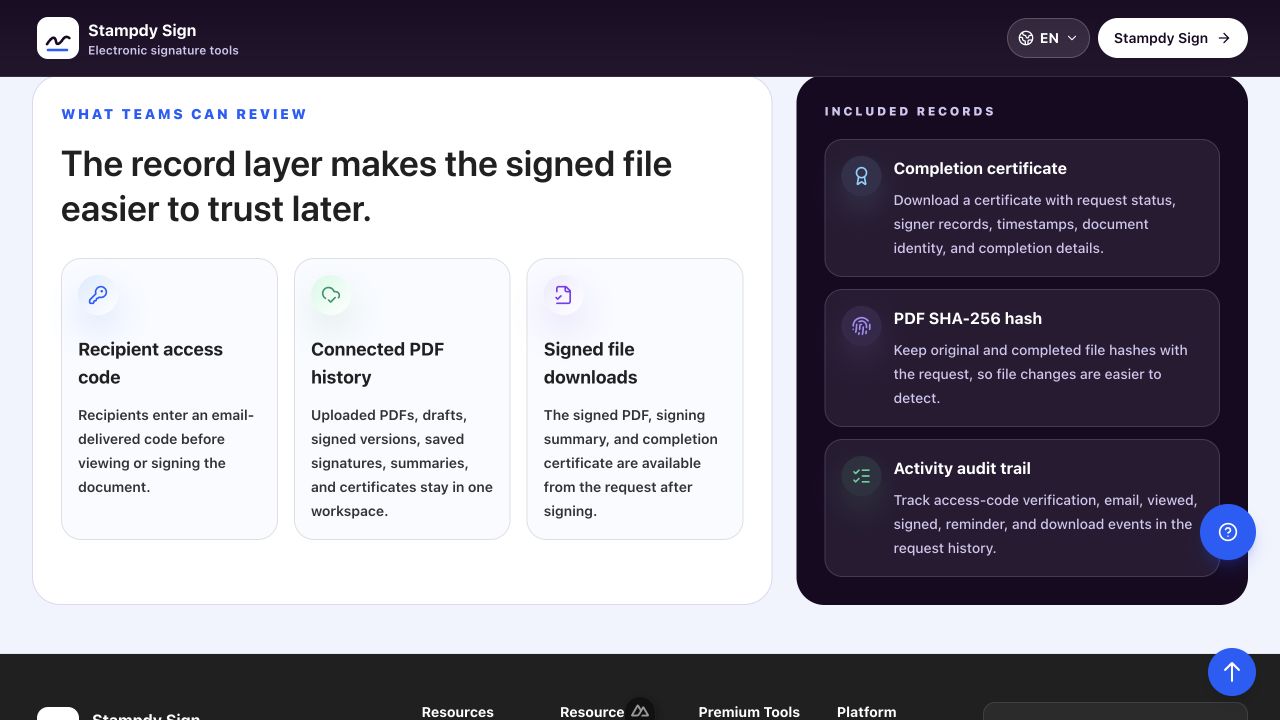
The current Stampdy request view can expose a signed PDF, signing summary, completion certificate, event history, and a PDF file hash in its trust-record area. These records serve different purposes. The completed PDF is the business document. The summary and event history describe workflow activity. A hash can help identify a particular file version. A certificate packages completion information. None of them should be described as a universal guarantee of identity, legal effect, or compliance without checking the applicable requirements.
Store the related records together or link them through a document-management entry. A small team can use a simple structure:
- Final approved PDF sent for signature.
- Completed signed PDF.
- Signing summary or completion record, when retained.
- A short internal note for replacements, exceptions, or authority checks.
- The follow-up task created by the agreement.
Do not retain extra personal data merely because it is available. Follow the organization's retention and access rules. Limit the record to what the process requires, keep it in an approved location, and remove redundant working copies when policy allows.
Connect Signing Evidence to the Business Decision
A complete trail shows what happened after signature. If the PDF is a vendor agreement, the next record might be a supplier activation task. If it is an employment document, the next action might be an onboarding checkpoint. If it approves a purchase, the owner may need to release an order or update a budget record.
This connection prevents a common failure: the signing request is marked complete, but the work it authorized remains pending. Add the signed-document location and effective date to the system that manages the resulting obligation. Assign an owner and due date where appropriate.
When a physical or digital stamp appears on the document, record its role separately. A stamp may identify a department, indicate review, or support document layout, but it should not be treated as evidence that a person consented. If the team prepares stamps before signing, use a controlled stamp maker process and verify approval before the PDF enters the signature workflow.
For higher-risk documents, have a second person review the final package against the request. This is not a demand for a large approval committee. It is a focused check that the signed PDF matches the intended document and that the supporting records belong to the same request.
Audit Trail Review Checklist
Review the trail with a short, repeatable checklist:
- The sent PDF has a stable title and version.
- The request owner and expected signers are identifiable.
- Signature fields match the names and page context.
- Obsolete requests are cancelled or clearly superseded.
- Status and event history are available for operational review.
- The completed PDF is stored in the approved location.
- Supporting summaries or certificates are retained only when required.
- Any authority, identity, or legal question is escalated to the appropriate reviewer.
- The business action created by the signed document has an owner.
If the document needs additional safeguards, use the Stampdy signing security overview as a product reference, then compare the available controls with the organization's actual policy. Product features and policy requirements are related, but they are not interchangeable.
Frequently Asked Questions
Is an audit trail the same as a signed PDF?
No. The signed PDF is the completed document. An audit trail adds context such as the request, recipient setup, statuses, events, summaries, replacement decisions, and storage handoff. The exact records to retain depend on the workflow and applicable requirements.
Does a completion certificate make every electronic signature legally valid?
No single product record can answer that for every transaction. Legal effect can depend on jurisdiction, document type, consent, identity, authority, record retention, and other facts. Treat the certificate as one workflow record and obtain legal or compliance guidance when enforceability matters.
How long should a small team keep signature records?
Use the organization's retention schedule and any applicable contractual, legal, or regulatory requirements. Avoid inventing a universal period. The document owner should know the approved storage location, access rules, and disposal date or trigger.
Should every status change be copied into another system?
Usually not. Keep the signing platform as the working source for request events, then record the business decisions that need to live elsewhere. Duplicating every event manually adds maintenance without necessarily adding useful context.
Conclusion
A useful electronic signature audit trail connects the approved input, intended recipients, request events, completed files, and resulting business action. Keep each record specific, avoid treating a status or certificate as more conclusive than it is, and close the workflow with a clear owner. For small teams, that disciplined chain is more valuable than a large collection of disconnected screenshots and copies.